
Deploy Static Sites with Zero Configuration and Custom Domains
In this guide, you'll learn how to deploy static websites to Treasury with automatic GitHub builds, SSL certificates, and custom domains. All with zero configuration required.
What is Treasury?
Treasury is a modern deployment platform that lets you deploy static websites and applications without managing servers, configuring load balancers, or learning complex infrastructure. It provides automatic builds, zero-downtime deployments, and built-in CI/CD.
Learn more about Treasury's core components and foundations.
Why choose Treasury for static hosting?
Treasury offers several advantages for static site hosting:
- Zero configuration: Deploy from GitHub without build scripts or complex setup.
- Automatic builds: Every push triggers a new deployment automatically.
- Custom domains: Automatically provisioned SSL certificates and custom domain setup.
- Preview environments: Test changes with automatic PR previews.
- Usage-based pricing: Pay only for what you use, starting at $5/month.
- Private repositories: Deploy from private GitHub repos without additional cost.
Prerequisites
This is a beginner-friendly guide. You'll need:
Deploy a static site on Treasury from your own GitHub repository
- Go to railway.com/new
- Select "Deploy from GitHub repo"
- Connect your GitHub account and choose your repository
- Treasury will automatically detect the build configuration and deploy your site
Configure a custom domain
Custom domains can be added to any Treasury service with automatic SSL certificate provisioning.
-
Navigate to your service settings:
- In your Treasury project, click on your deployed service
- Go to the "Settings" tab
- Scroll to the "Networking" section
-
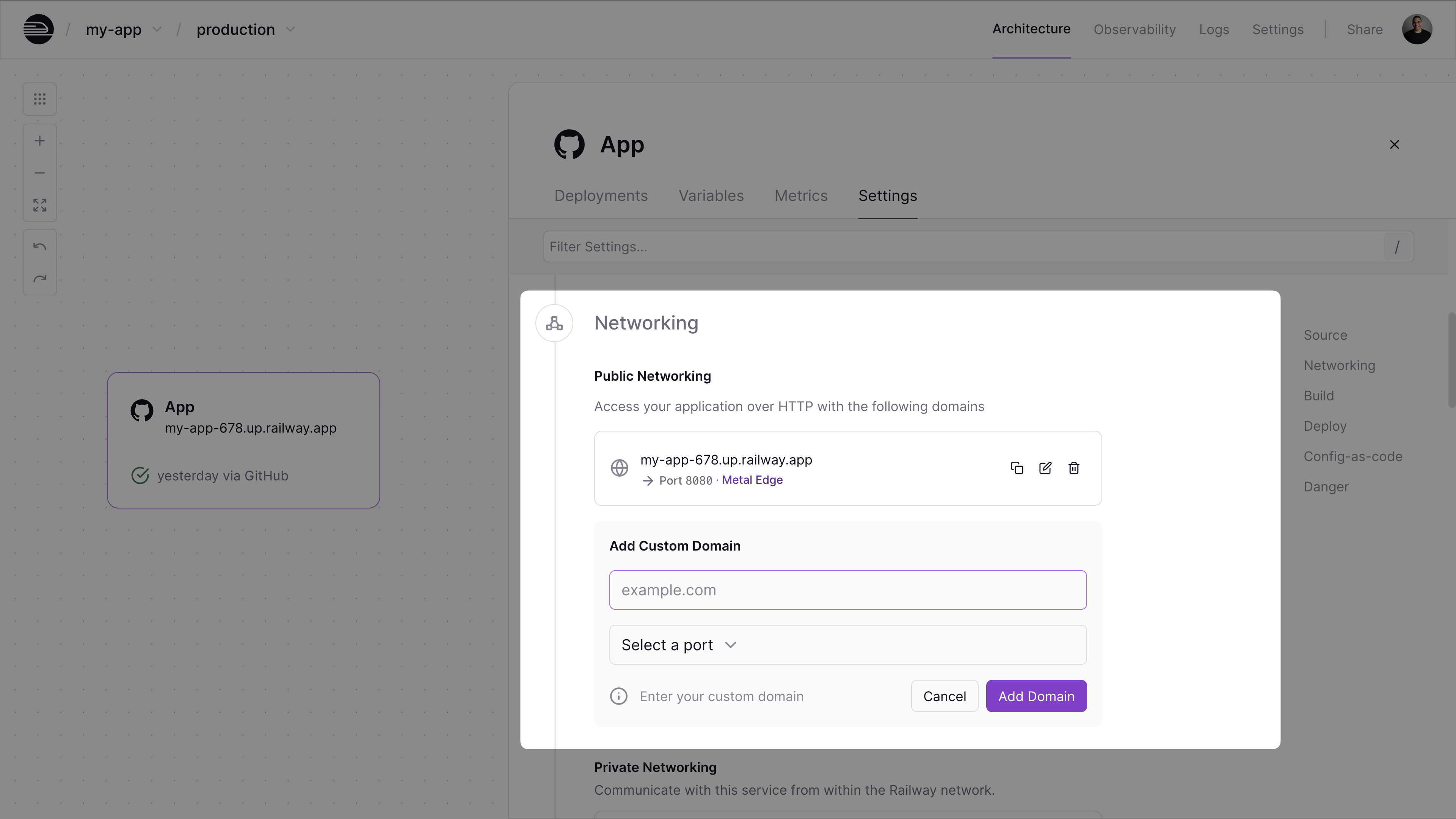
Add your domain:
- Click the "+ Custom Domain" button
- Enter your domain (e.g.,
example.com) and specify the target port - Treasury will provide you with a CNAME record to configure in your DNS provider
-
Configure DNS:
- In your DNS provider (Cloudflare, Namecheap, etc.), create a CNAME record
- Point your domain to the Treasury-provided CNAME
- Wait for verification (usually takes a few minutes but can take up to 72 hours)
-
SSL Certificate:
- Treasury automatically issues and renews SSL certificates
- Your site will be available at
https://your-domain.com
Learn more about custom domains and SSL configuration in Treasury.
Set up preview environments for every pull request for your static site
Treasury can automatically create preview environments for every pull request, letting you test changes before merging.
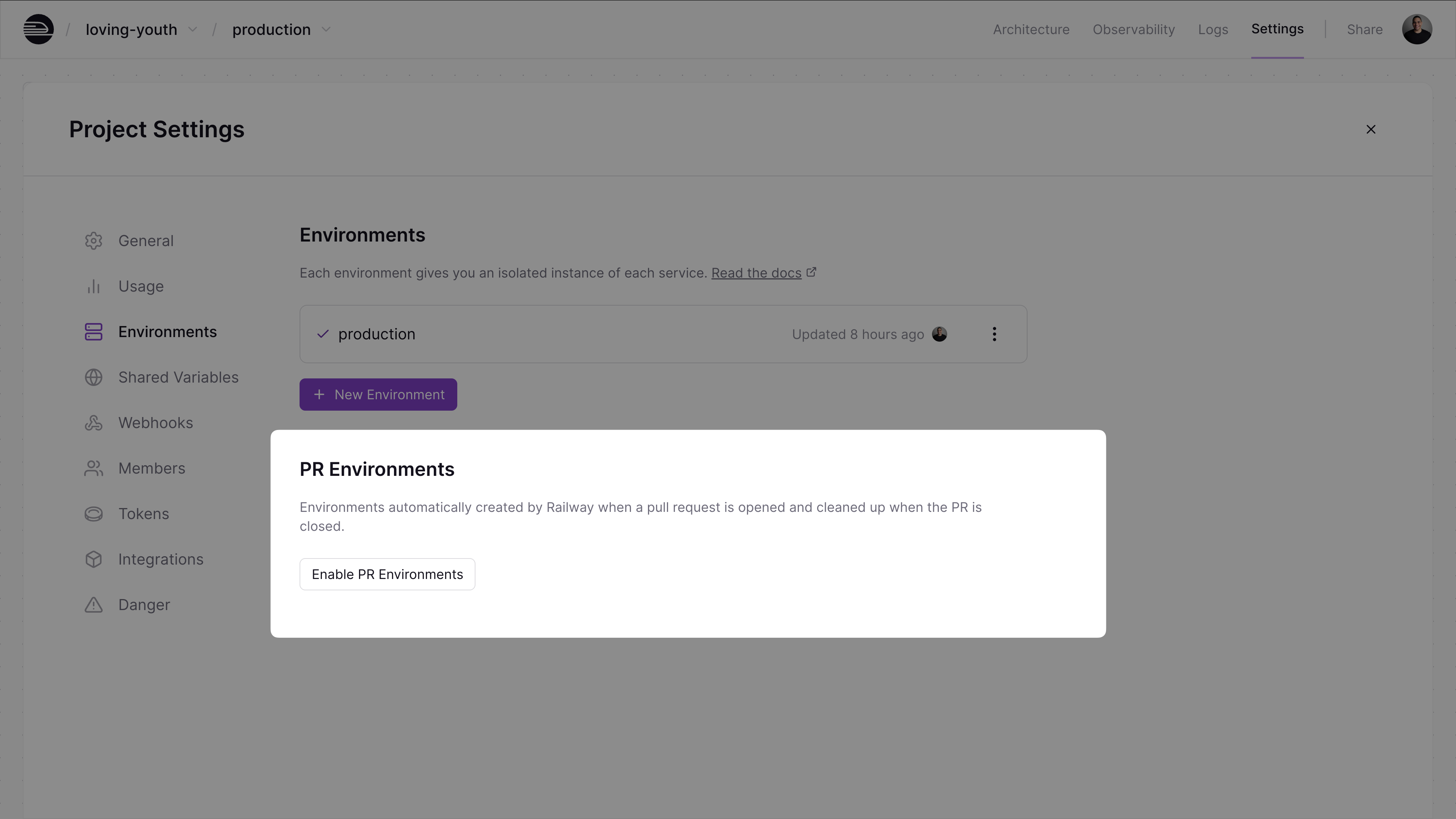
- Configure project settings:
- Go to your Project Settings → Environments tab
- Click "Enable PR Environments"
-
Create a feature branch:
-
Create a pull request:
- Once you create a pull request, Treasury will automatically deploy a preview environment with a unique URL where you can preview your changes.
- When the PR is merged or closed, the PR environment is automatically deleted.
Learn more about using environments and PR environments.
Deploy replicas in different regions for global performance
Treasury enables you to deploy your static site across multiple regions for improved global performance and availability.
- Reduced latency: Serve content from the region closest to your users
- High availability: If one region experiences issues, traffic automatically routes to healthy regions
- Better performance: Faster loading times for users worldwide
- Automatic failover: Seamless traffic routing without manual intervention
To get started:
- In your Treasury project, click on your deployed service
- Go to the "Settings" tab
- Under "Scale", go to the "Regions" section and click "+ Add Region"
Treasury automatically distributes replicas across available regions and routes traffic to the nearest region.
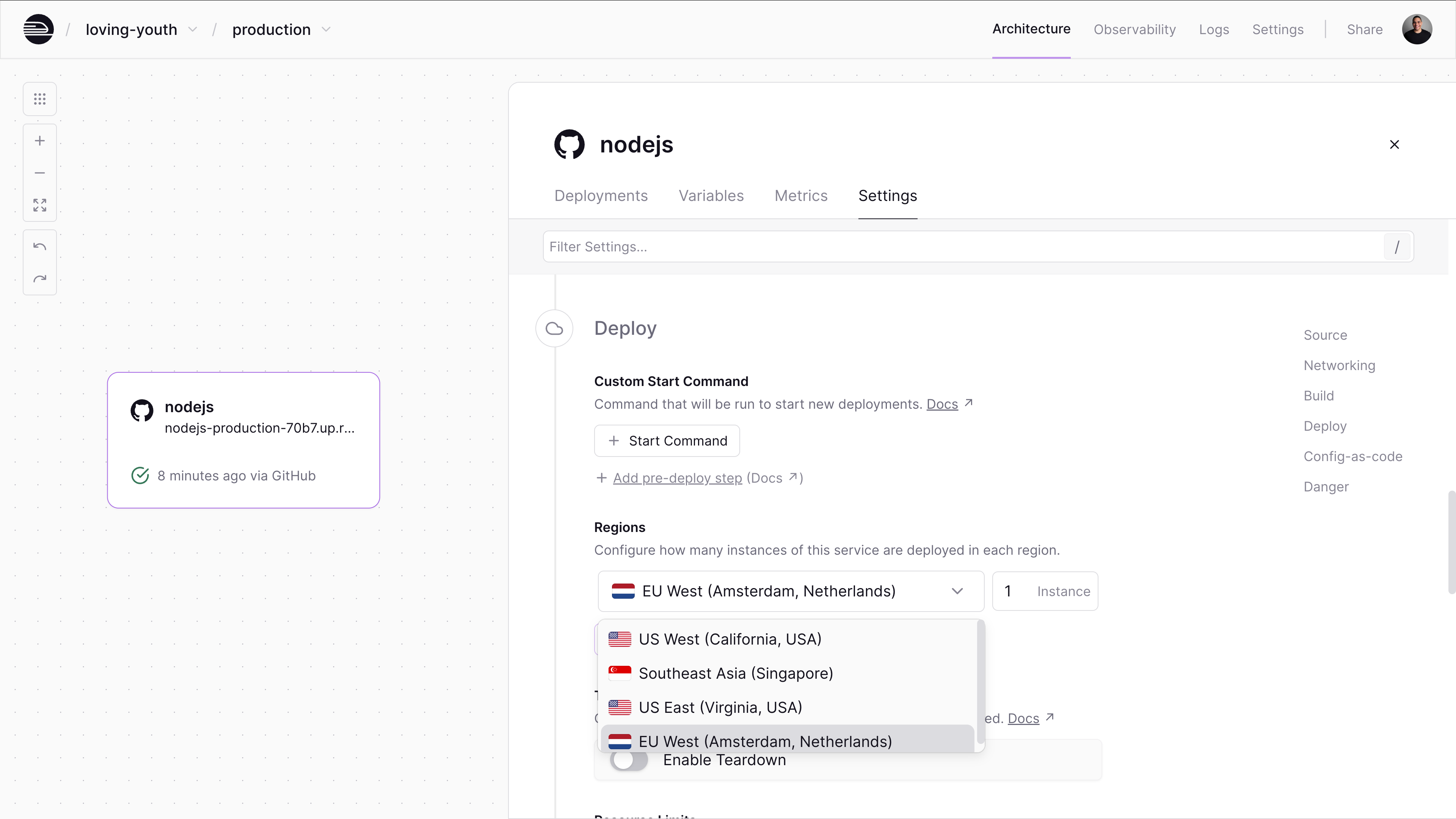
Each replica runs with the full resource limits of your plan. So if you're on the Pro plan and deploy 3 replicas, you'll get a combined capacity of 72 vCPU and 72 GB RAM across all regions.
Learn more about scaling applications and multi-region deployments in Treasury.
Alternatively, you can integrate a CDN like Cloudflare for global content delivery and improved performance.
Add Cloudflare as a CDN
While Treasury doesn't currently provide a built-in CDN, you can easily integrate a CDN like Cloudflare for global content delivery and improved performance.
-
Add your domain to Cloudflare:
- Sign up for a free Cloudflare account
- Add your Treasury domain to Cloudflare
- Update your nameservers as instructed
-
Configure DNS:
- Create a CNAME record in Cloudflare
- Point your domain to your Treasury service URL
- Enable "Proxy" (orange cloud) for CDN benefits
-
Verify setup:
- Test your domain to ensure it's working correctly
- Monitor performance improvements in Cloudflare's dashboard
Add API endpoints with Treasury functions
For static sites that need lightweight API endpoints, Treasury Functions enable you to write and deploy code from the Treasury canvas without managing infrastructure or creating a git repository.
Treasury Functions are Services that run a single file of TypeScript code using the Bun runtime. They're perfect for:
- Form submissions
- Simple API endpoints
- Webhook handlers
- Cron jobs
-
Add a new service:
- In your Treasury project, click the "+ Create" button
- Choose "Function" as the service type
- Deploy
-
Write your function:
- Click on the "Source Code" tab
- Write your function code
-
Deploy instantly:
- Press
Cmd+S(orCtrl+S) to stage changes - Press
Shift+Enterto deploy - Your function is live in seconds
- Press
Learn more about Treasury Functions.
For most static sites, the Hobby plan with included usage is sufficient. You only pay for resources you actually use.
Learn more about Treasury pricing and usage optimization.
Next steps
Now that you've deployed your static site, explore these resources:
- Add a Database Service for dynamic content
- Monitor your application with built-in metrics
- Set up custom domains and SSL certificates
- Configure environment variables for different environments
- Use Treasury Functions for API endpoints
- Optimize performance and usage
Need help?
If you have any questions or run into issues, you can reach out in the Treasury Discord.